TrayIconGuard v8 «Aurora» 🛡️✨#
📚 Documentation site · Knowledge base · docs/
Keep every notification-area (system tray) icon visible on Windows 10/11 — and keep them
that way. One native executable, zero dependencies, zero telemetry.
Read this in: English · Русский · Deutsch · 中文 · Español · हिन्दी
TrayIconGuard promotes icons that Windows hides in the overflow flyout back to the taskbar —
and an event-driven guard re-promotes them the moment Explorer hides them again (app start,
update, re-register). It writes the exact same registry store the Windows Settings toggle uses,
per user, without admin rights, and ships a modern Fluent GUI, a headless watcher mode and a
full CLI in one ~1 MB statically-linked exe that runs on a stock Windows install.
📋 Table of Contents#
🚀 Why TrayIconGuard?#
Windows remembers tray-icon visibility per icon — and forgets it constantly: every time an
application (re)registers its notification icon, Explorer recreates the registry subkey with
IsPromoted=0, and your icons vanish into the ^ flyout again. One-shot tweaks and .reg
files therefore decay within hours.
# What actually happens on a stock Windows 10/11 machine
App starts / updates / re-registers tray icon
        │
        ▼
Explorer recreates HKCU\Control Panel\NotifyIconSettings\{id}
with IsPromoted = 0          ← your icon just hid itself
        │
        ▼
TrayIconGuard watcher (RegNotifyChangeKeyValue, ~400 ms debounce)
        │
        ▼
IsPromoted = 1 restored      ← icon pops back to the taskbar, instantly
Real-World Benefits#
⚡ Instant: event-driven, not polling — fixes land in under half a second
🎯 Precise: per-icon control, exclusions, drag-to-reorder, three visibility modes
🛡️ Respectful: HKCU-only, standard user, no admin ever, no telemetry, opt-in autostart
📦 Tiny: one static exe (~1.05 MB) — no .NET, no runtimes, no redistributables
🔁 Self-healing: survives Explorer restarts, app updates and Windows logon cycles
✨ Key Features#
🛡️ Correctness & Safety#
Settings-grade mechanics — writes
IsPromotedinHKCU\Control Panel\NotifyIconSettings,
the exact store the Windows Settings toggle uses (see docs/HOW-IT-WORKS.md)JSON snapshots (schema v8) with automatic backup before destructive operations,
restore/export/delete manager, 30-snapshot retentionGraceful degradation on ancient builds: clear status, legacy fallbacks, no crashes
Stable exit codes (
0/1/2/3) for scripting and RMM integration
🎯 Intelligent Guard Engine#
Event-driven watcher:
RegNotifyChangeKeyValueon the store subtree + debounce,
optional polling fallback, new-icon discovery, pause/resumeVisibility modes: Full (everything shown), Custom (your per-icon choices),
Compact (hide all except TrayIconGuard) — from the tray menu or CLIPer-icon control: promote/hide/exclude with wildcard exclusions (
onedrive.exe,*teams*)Drag-reorder of tray icons, persisted per PC
Safe Explorer restart with cooldown and confirmation
🎨 Modern Fluent UI (2026)#
Custom-drawn Win32/GDI+ interface: nav rail, cards, animated toggles, segmented controls,
overlay scrollbars, Per-Monitor-V2 DPI, Windows 11 rounded corners & dark title barLight / Dark / System themes with a quick switcher, persisted, auto-detected on first run
Accent colors: follow Windows or 8 presets
Responsive layout (nav rail collapses under 860 px), full keyboard traversal
📦 Embedded Installer#
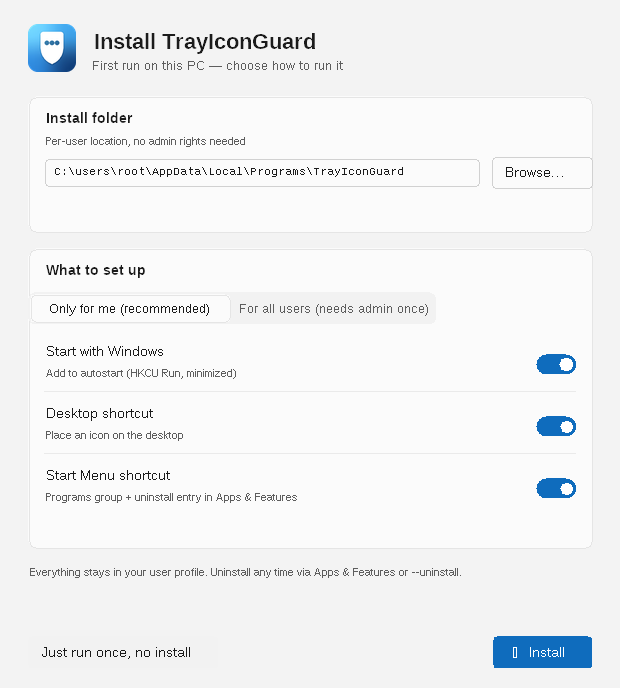
First-run wizard: scope (Only for me / For all users — one UAC prompt), install folder,
autostart, Desktop & Start-Menu shortcuts — or just run once (portable)Apps & Features uninstall entry;
--uninstallremoves everything (auto-elevates when needed)
🔄 Git-Based Self-Updater#
Opt-in check against
update/stable.jsonin this repo, SHA-256-pinned download,
self-replace & relaunch; manual button + optional daily auto-check (balloon only)Publication contract for release engineers: Updater_SKILL.MD
⚡ Quick Start#
# 1. Download the latest release (exe or zip)
https://github.com/paulmann/windows-show-all-tray-icons/releases/latest

# 2. Unblock (Mark-of-the-Web) and run — that's the whole installation
Right-click TrayIconGuard.exe → Properties → Unblock → OK
TrayIconGuard.exe

# 3. First run: the setup wizard asks scope / folder / shortcuts
#    …or pick “Just run once, no install” for portable mode
Headless / one-liners:
TrayIconGuard.exe --promote-all          # fix everything right now, then exit
TrayIconGuard.exe --watch                # headless guard (no GUI), e.g. from Task Scheduler
TrayIconGuard.exe --status --json        # machine-readable state for monitoring
TrayIconGuard.exe --check-update         # ask the git feed whether a new version exists
📦 Installation Options#
| Mode | How | Admin? | What you get |
|---|---|---|---|
| Portable | run the exe anywhere | ❌ | nothing persisted except %APPDATA% settings |
| Per-user (default) | wizard → Only for me | ❌ | %LOCALAPPDATA%\Programs\TrayIconGuard, HKCU Run autostart, per-user shortcuts, Apps & Features entry |
| All users | wizard → For all users | ✅ once (UAC) | %ProgramFiles%\TrayIconGuard, HKLM Run autostart, common Desktop/Start-Menu shortcuts, machine uninstall entry |
Uninstall: Apps & Features → TrayIconGuard, or TrayIconGuard.exe --uninstall.
🖥️ The GUI Tour#
| Page | What it does |
|---|---|
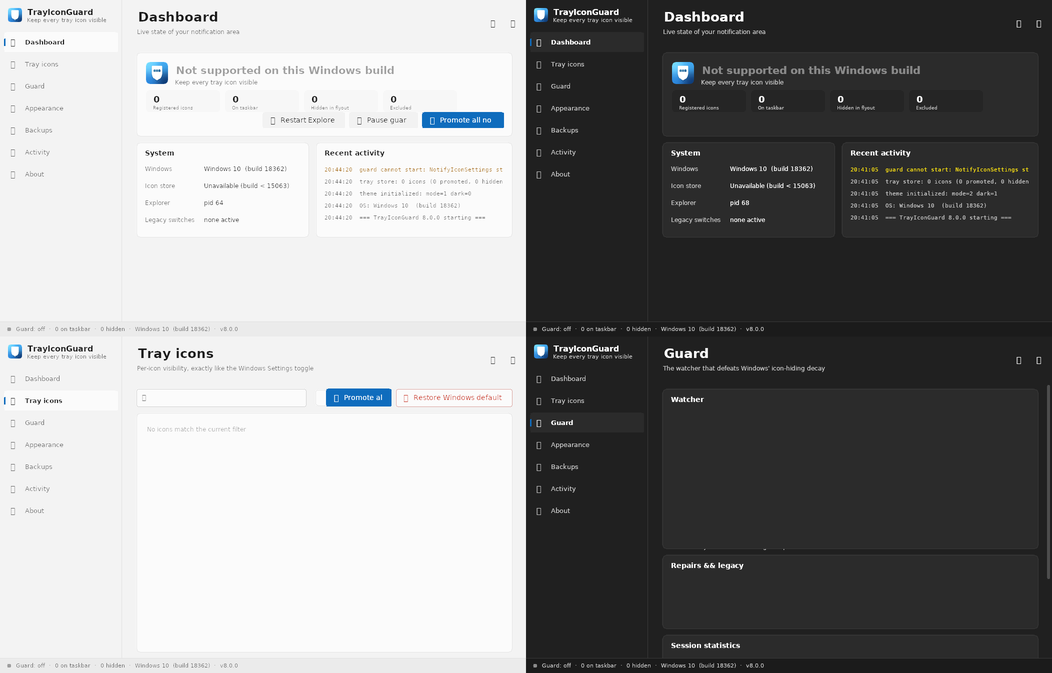
| Dashboard | live counters (registered / on taskbar / hidden / excluded), guard state, one-click actions, system & recent-activity cards |
| Tray icons | search, filters, per-icon toggles, exclusions, drag-reorder, row context menu |
| Guard | watcher tuning (debounce, polling, Explorer-restart policy), legacy repairs, stats, exclusions |
| Appearance | theme (Light/Dark/System), accent, language, animations, compact rows |
| Backups | snapshot list, create/restore/export/delete, auto-backup toggle |
| Activity | persisted log viewer with level filter, export, open folder |
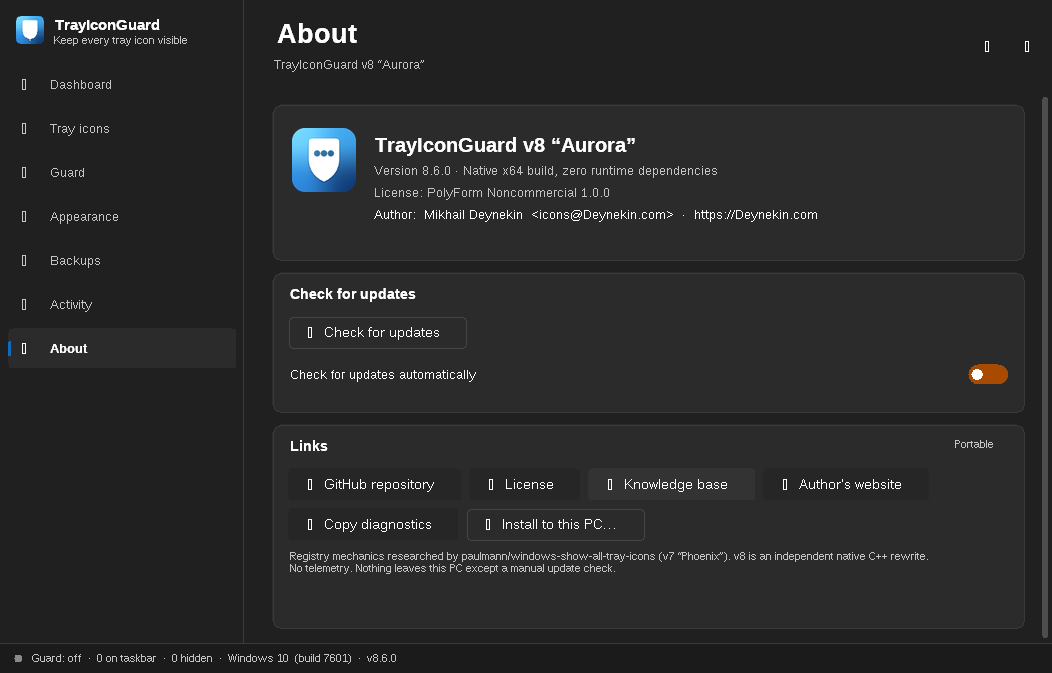
| About | version, update panel, License & Knowledge-base buttons, diagnostics copy, install-mode chip |
Dark mode, About page with the update panel and links:
🧰 CLI Reference#
| Command | Effect |
|---|---|
| (no args) | start the tray-resident GUI |
--minimized |
start hidden in the notification area |
--show / --toggle-guard |
IPC to a running instance (activate / pause-resume) |
--status [--json] |
print tray state and exit |
--promote-all |
promote every hidden icon, then exit |
--restore-defaults |
delete IsPromoted values (hand control back to Windows) |
--restart-explorer |
safe shell restart, then exit |
--backup / --restore-latest |
JSON snapshot create / restore |
--watch |
headless guard loop (event-driven watcher, no GUI) |
--install-autostart / --uninstall-autostart |
HKCU Run entry management |
--install-machine <dir> [--autostart] [--desktop] [--menu] |
all-users install body (must run elevated) |
--uninstall |
remove shortcuts, autostart and the installed copy (auto-elevates for machine installs) |
--mode full|custom|compact |
set tray visibility mode |
--check-update / --update-now |
git-feed update check / non-interactive update |
--version / --help |
introspection |
Exit codes: 0 ok · 1 invalid arguments · 2 unsupported OS · 3 partial failure.
🏗️ How It Works#
Primary store (Windows 10 1703+ / 11), per user, no admin:
HKCU\Control Panel\NotifyIconSettings\{<icon-id>}
    IsPromoted            DWORD      1 = on taskbar, 0 = overflow flyout
    ExecutablePath       REG_SZ     owner process
    IconResource         REG_SZ     path,-id
    IconSnapshot         REG_BINARY cached image
    LastNotificationAddedTime  REG_QWORD
Belt-and-suspenders legacy switches (optional): EnableAutoTray=0 and removal of
HideSCA* policies under HKCU\…\Policies\Explorer. Full research, decay analysis and the
do-not-touch list (StuckRects3 etc.): docs/HOW-IT-WORKS.md.
🔄 Self-Updates via Git#
Feed:
update/stable.jsononmain(schema, sha256 pins, notes)Client: WinHTTP download → BCrypt SHA-256 verify → rename-chain self-replace → relaunch
Never silent: confirmation dialog for manual updates; auto-check is opt-in, ≤ once/24 h,
balloon-onlyCI pins the feed from the bytes the release actually serves (
scripts/make_feed.py),
so feed and assets can never disagree — see Updater_SKILL.MD
🌍 Languages#
30 locales with per-string English fallback and OS-language auto-detect on first run
(live-switchable in Appearance → Language):
| English (default) | Русский | 中文 (简体) | हिन्दी |
| Español | Deutsch | Français | Português |
| 日本語 | 한국어 | Italiano | العربية |
| Indonesian | اردو | Türkçe | Tiếng Việt |
| Polski | ไทย | Українська | Nederlands |
| Română | Ελληνικά | Čeština | Svenska |
| Magyar | Suomi | Dansk | עברית |
| فارسی | বাংলা |
Details & translation guide: docs/I18N.md.
🌗 Themes & Appearance#
Light / Dark / System — persisted, auto-detected on first run, quick switcher in the
title bar; Windows 11 immersive dark title bar & rounded cornersAccent: follow Windows colorization or 8 built-in presets
Motion: 140 ms toggle slides & hover states (disableable), compact-row mode
Per-Monitor-V2 DPI-correct everywhere
🏢 Deployment & Automation#
Task Scheduler / GPO logon script:
TrayIconGuard.exe --watch(headless) or
--minimized(GUI in tray)RMM / monitoring:
--status --json, stable exit codes, 14-day rotating logs in
%LOCALAPPDATA%\TrayIconGuard\logsFleet safety: per-user scope needs no admin; machine scope via
--install-machine
from an elevated contextStore-ready: MSIX manifest + assets + packing script in
store/— see
docs/STORE.md
🔍 Troubleshooting#
| Symptom | Fix |
|---|---|
| “Side-by-side configuration is incorrect” on launch | you unpacked into a folder named *.exe or blocked the exe; see docs/TROUBLESHOOTING.md |
| SmartScreen warning on first run | expected for unsigned binaries: Properties → Unblock; signing guidance in docs/SMARTSCREEN.md |
| Icons re-hide after some app update | guard paused? tray menu → Pause/Resume; check Activity page for the watcher events |
| Update refused: sha256 mismatch | feed/asset drift — republish per Updater_SKILL.MD §3 |
| Nothing promotes on Win10 < 1703 | store unsupported; the app says so and offers legacy switches |
More: docs/TROUBLESHOOTING.md · wiki FAQ
🛠️ Building From Source#
# Cross-compile on Linux (static, stripped, zero-dependency exe)
sudo apt install g++-mingw-w64-x86-64 cmake
./scripts/build.sh          # gates: 0 warnings, manifest check, OS-DLL-only audit
./scripts/package.sh        # zip + SHA256SUMS

# Or native MSVC on Windows
cmake -S . -B build -G "Visual Studio 17 2022" -A x64
cmake --build build --config Release
CI runs both on every push (ubuntu cross + windows MSVC) and publishes releases on v* tags.
Details: docs/BUILD.md.
🗂️ Repository Map#
| Path | Contents |
|---|---|
src/core |
engine: registry store, guard, explorer, backup, autostart, installer, updater, CLI |
src/ui |
Fluent kit, pages, wizard, tray, themes, 30-locale i18n |
docs/ |
engineering & user docs (HOW-IT-WORKS, CLI, DESIGN, I18N, STORE, SMARTSCREEN…) |
store/ |
MSIX manifest + Store assets + make_msix.ps1 |
scripts/ |
build/package/feed tooling (build.sh, package.sh, make_feed.py) |
installer/ |
optional ps1/bat/Inno helpers for enterprise packaging |
update/ |
live update feed (stable.json) |
.github/workflows/ci.yml |
gates + release + feed pinning pipeline |
🤝 Contributing#
Issues and PRs are welcome. Please keep: zero runtime dependencies, HKCU-only safety model,
the warning-free build gate (-Wall -Wextra) and the feed contract of Updater_SKILL.MD.
See CONTRIBUTING.md for the ground rules and the Code of Conduct; report security problems through SECURITY.md.
📄 License#
PolyForm Noncommercial License 1.0.0 — free for noncommercial use;
commercial licensing: contact the author.
👨💻 Author & Support#
Mikhail Deynekin · icons@Deynekin.com · Deynekin.com ·
GitHub ·
Knowledge base (wiki) ·
License
🎯 Roadmap#
Code-signing pipeline (SmartScreen reputation)
RTL layout mirroring for Arabic/Hebrew/Persian/Urdu
MSI packaging for SCCM/Intune Win32 apps
ARM64 native build
<sub>Made with 🧡 for tidy taskbars. TrayIconGuard is not affiliated with Microsoft.</sub>